Preview window
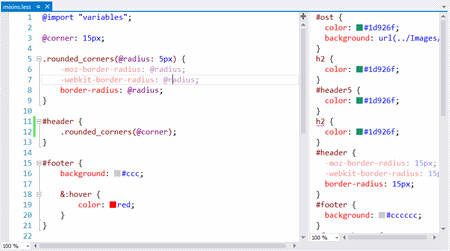
LESS comes with a preview window located at the right side of the editor. It shows the compiled output every time you save the document.

The dynamic stylesheet language.
LESS extends CSS with dynamic behavior such as variables, mixins, operations and functions.
Web Essentials uses the node-less compiler and it always uses the latest version
For the past couple of years, Web Essentials have been including features for compiling LESS, Sass and CoffeeScript. As of Web Essentials 2015 that is no longer the case. However, this feature is still available with a new stand alone Visual Studio 2015 extensions.
You can find more details about the why and how of this extension on this blog post or you can download it from here.
LESS comes with a preview window located at the right side of the editor. It shows the compiled output every time you save the document.
You can set all the compiler settings from Tools -> Options. They include:
Web Essentials uses NodeJS to run the compiler. It's the fastest and most accurate compiler for LESS available.
Source Map generation is fully supported and will produce .map files. This feature can be enabled in the Options dialog.
If you want the compiled output in a separate folder, then you can specify which one in the Options dialog.
Web Essentials makes it easy to convert property values to LESS variables. Select the text you want extracted, right-click the selection and click "Extract to variable...".
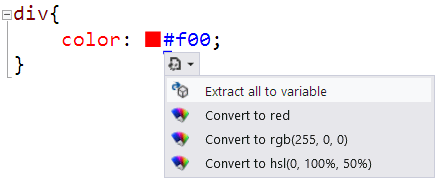
Colors are special cased and a Smart Tag makes it easy to extract all instances of the same color in the document into a LESS variable.
Select the properties you want to extract. Then right-click the selection and click "Extract to mixin...".
When a LESS file is compiled, it can now also be minified to produce a much smaller CSS file.