Settings
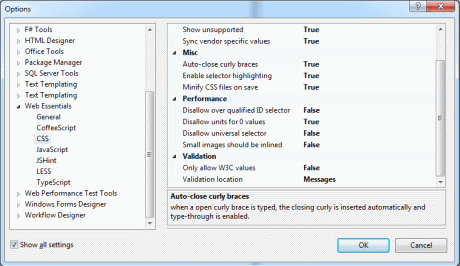
All settings can be found by going to Tools -> Options -> Web Essentials.

General features that apply to many aspects.
All settings can be found by going to Tools -> Options -> Web Essentials.
Settings can either be global or specific to any solution. By scoping settings to individual solution, you can ensure that all team members are using the same settings.
To enable solution settings, right-click any item in Solution Explorer and click "Create solution settings".
.weignore document is a file containing the list of linefeed-separated file-path patterns to prevent compilers and linters used in Web Essentials. It accepts all styles supported by .jshintignore and both Unix-like and Windows-like file paths.
It works just like .jscs,.jshintrc, coffee.json, coffeelint.js and tslint.json. For each request, it looks for .weignore file in the current directory, then its parent until the drive's root. After that, it will look into user's HOME directory (C:\Users\<your-name>). The first config file that is found in the chain takes effect. All the file-path patterns inside the .weignore file are relative to the source file being processed, not the .weignore file itself.
Each line must respect this pattern : exclusion-pattern [compiler/linter-to-exclude]
Here is the list of all the (node-based) compilers and linters currently supported by WebEssentials:
Currently it only targets node.js pipeline services, meaning TypeScript compilation and Markdown are out.
More information about .weignore can be find here.
# To ignore file path including the word "style":
**/**style**

# To ignore path with .min.js at the end:
**/**.min.js

# To ignore file path including the folder name "slug":
**\slug\**

# or
**/slug/**

# To ignore the absolute path:
C:\temp\foo.ts
# or
C:/temp/foo.ts # To negate the ignore, use ! before the path:
!**/**Content
# To ignore the file from any kind of compilation (only),
# specify the term "compiler" after the pattern, separated by TAB:
**/doodle.less compiler
# To ignore the file from being processed by LESS compiler,
# use the word less:
**/doodle.less less
# To ignore the file from being processed by Autoprefixer,
# use the word autoprefixer:
**/bug.scss autoprefixer
# To ignore the file from being processed by a linter,
# use the word linter:
**/*.js linter
# You can also specify a linter's name:
**/random.js jscs
# If there a case which requires specifying multiple service names,
# use comma-separated list:
**/doodle.less less, autoprefixer