Preview Window
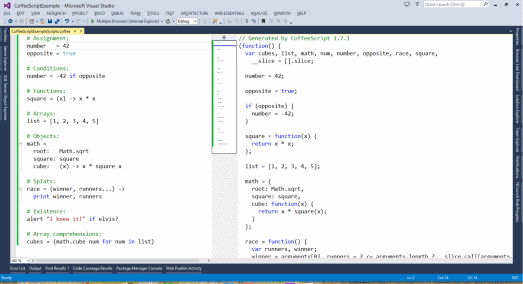
When a CoffeeScript file (.coffee) is saved in Visual Studio, Web Essentials will compile it automatically and generate a preview.

CoffeeScript is a little language that compiles into JavaScript. Underneath all those awkward braces and semicolons, JavaScript has always had a gorgeous object model at its heart. CoffeeScript is an attempt to expose the good parts of JavaScript in a simple way.
For the past couple of years, Web Essentials have been including features for compiling LESS, Sass and CoffeeScript. As of Web Essentials 2015 that is no longer the case. However, this feature is still available with a new stand alone Visual Studio 2015 extensions.
You can find more details about the why and how of this extension on this blog post or you can download it from here.
When a CoffeeScript file (.coffee) is saved in Visual Studio, Web Essentials will compile it automatically and generate a preview.
You can set all the compiler settings from Tools -> Options
You can also use the Iced CoffeeScript compiler for added features. To run Iced CoffeeScript, simple use the .iced file extension
Web Essentials uses NodeJS to run the compiler. It's the fastest and most accurate compiler for CoffeScript and Iced CoffeeScript available.
Source Map generation is fully supported and will produce .map files. This feature can be enabled in the Options dialog.
If you want the compiled output in a separate folder, then you can specify which one in the Options dialog.
When a CoffeeScript file is compiled, it can now also be minified to produce a much smaller JavaScript file.
Two very useful commands is comment and uncomment. They are fully supported for CoffeeScript.
Indentation is handled on ENTER so you don't have to hit TAB so many times.